Software Design Exercise
Demonstrating Software Design Skills
This lab explores the fundamentals of software design, and provides an outline for working towards a knowledge claim against the software design skill.
Defining the problem
In order to plan our program, we must first understand the problem that is being addressed. For this lab, the problem is defined as follows:
A program is needed that processes temperature data from a CSV file. The file contains two columns: temperature values and their respective units ('Celsius', 'Fahrenheit', or 'Kelvin'). The program must provide a means read this data into memory, while also providing an interface that allows the programmer to convert and access the values stored in memory using any of the three supported units. For example, if one had 25.0 Celsius stored in an object named `TemperatureReading`, one should be able to access the temperature reading in Fahrenheit using something like `TemperatureReading.Fahrenheit()`, getting a return value of 77.0. The program must also provide a means to write the data back into a CSV file, using one of the defined temperature units for all readings.
From this definition, we can see that we require a way to convert between Kelvin, Fahrenheit, and Celsius. The following equations may prove useful in this endeavour:
- Celsius to Fahrenheit: \(F = (C \times \frac{9}{5}) + 32\)
- Celsius to Kelvin: \(K = C + 273.15\)
- Fahrenheit to Celsius: \(C = (F - 32) \times \frac{5}{9}\)
- Fahrenheit to Kelvin: \(K = (F - 32) \times \frac{5}{9} + 273.15\)
- Kelvin to Celsius: \(C = K - 273.15\)
- Kelvin to Fahrenheit: \(F = (K - 273.15) \times \frac{9}{5} + 32\)
For this lab it is assumed that you are creating a software design document. The exercises will therefore guide you through producing the elements required within said document.
Open a new document in your editor of choice (or indeed a new Mahara page), and add the title: ‘Software Design: A Temperature Convertor’
Below this title, add a section titled ‘Problem Definition’ that contains the problem definition above. Feel free to reword anything that you feel is unclear.
Defining the Structures and Classes
Using the problem definition above, we can now define the datastructures and Classes required to implement the program.
The TemperatureReading Class
Given that we have data readings that may need converting on the fly whenever they are accessed, it makes sense to create a TemperatureReading object that provides methods that implement the conversion equations provided in the previous section.
Logically, the user should not need to know which unit the temperature reading was actually stored using, and should instead be able to simply request a given unit when accessing the data. This means our TemperatureReading object will require three methods besides the __init__() method:
TemperatureReading.Celsius(): Returns the stored temperature in Celsius.TemperatureReading.Fahrenheit(): Returns the stored temperature in Fahrenheit.TemperatureReading.Kelvin(): Returns the stored temperature in Kelvin.
The class will also require two properties to store the reading and it’s unit:
TemperatureReading.value: The temperature reading (float).TemperatureReading.unit: The unit that the reading was taken using (string).
Create a UML diagram for the TemperatureReading class. Make sure to identify all of the Methods and Properties that the class will need, along with the types for any arguments or properties. You should also include the return type for any method that returns data.
You can use any image editor you may like for this exercise - though we recommend PlantUML as a flexible UML tool. There is an online editor as well as good documentation on creating Class UML diagrams. This tool lets you save the image as an SVG or PNG.
Once you have created the UNL diagram, add the image to your document under a section titled ‘Required Classes’.
The List of Temperatures
The problem also states that the program will need to read several temperatures from a CSV file. This implies that we will require a list of TemperatureReading objects.
Add a section titled ‘Required Data Structures’ and create a bullet-point list here to state that you will have a list containing TemperatureReading objects, making sure to specify the name of the list that will be used in your code.
Creating the Flowcharts
Now that all data structures and classes have been defined, we can move on to defining the functions and code flow.
There are 5 key functions that must be defined here: The three TemperatureReading methods, a function to enable importing of the CSV data, and a function to enable exporting of the CSV data.
As we have not covered CSV file access in lectures yet, these last two function flowcharts are provided for you in .
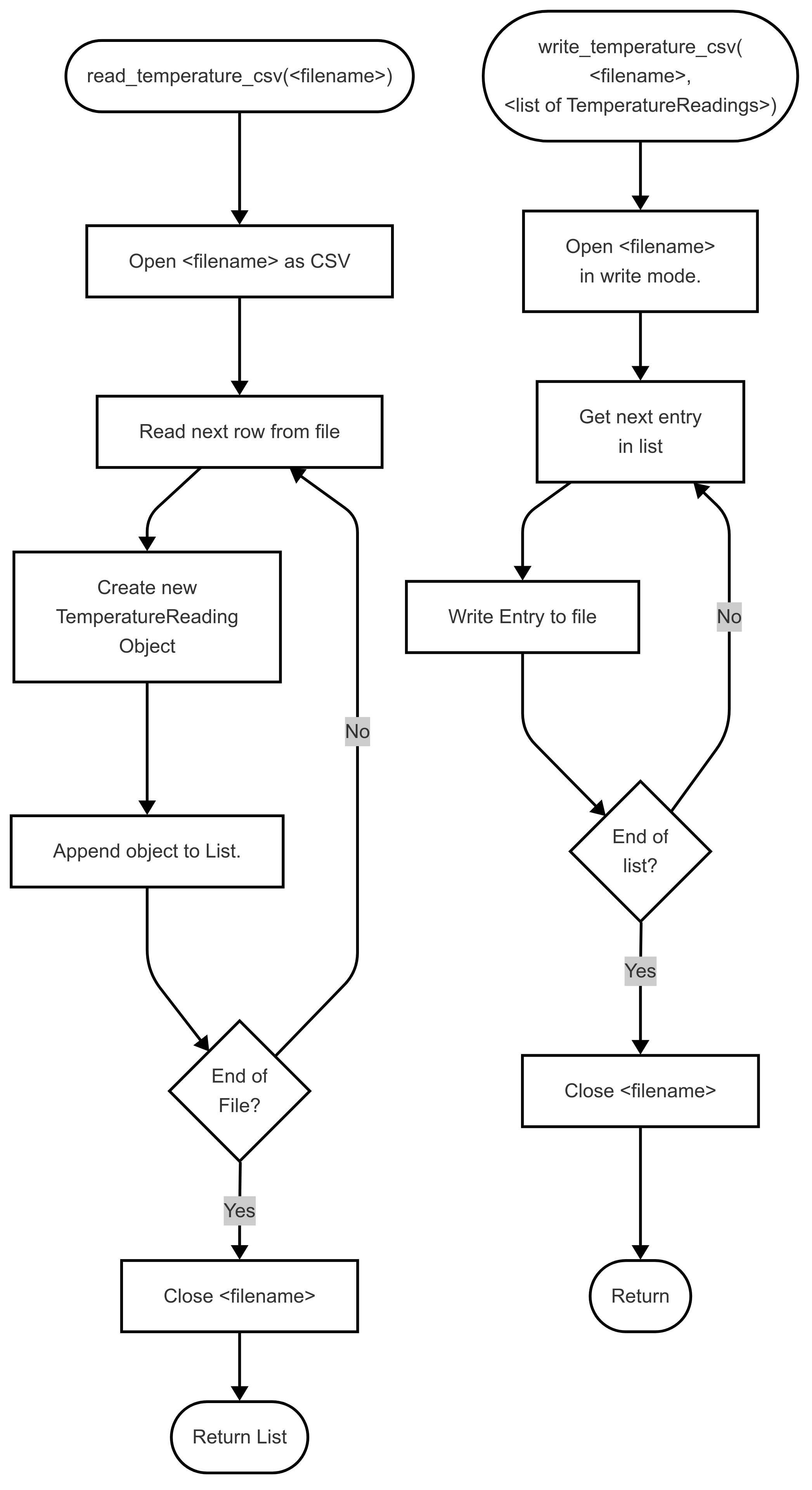
Create a flowchart for each of the TemperatureReading class methods. You may wish to use Mermaid to achieve this. There is a free online editor available.
Add these flowcharts to a section in your document titled ‘Methods and Functions’. You may wish to add some supporting text for each of these, such as a brief summary of the functions purpose.
Submitting the Design
Once the design document is complete, you can generate a PDF and upload it to Mahara to claim the skill.
Application Level Claims
The work so far is designed to support a claim of the software design skill at Knowledge level. In this section, I provide an outline for an expansion on the work so far that will make it possible to claim the skill at application level.
Update the design document to implement a TemperatureAnalysis tool that allows the user to plot a list of temperatures. For this element, modify the class definitions to add a timestamp into the base temperature class for recording the time of the temperature reading. Then provide methods to allow the user to calculate the minimum, maximum, mean, and standard deviation of the temperature list.
Create a high-level flowchart that can take a passed file and perform analysis on said file, utilising the functions and classes planned so far.